How to enable self-service analytics by building an AI data bot
This article is the technical counterpart of my article An AI bot won't save your overwhelmed data team. That article covers the foundations. This article covers the build.
Once you have all the foundations, you can finally work on the AI solution. Here’s how we did it. We call our bot Chandler, and it answers questions about company data in Slack and in Claude, from the same definitions our dashboards use. Most of the work wasn’t code, though. It was writing down what the business means, in a place a model can read.
Here’s the method in short. You write your business knowledge into the semantic layer, structure it like a tree, and pull it into your own database every night. The bot then answers from saved answers and stamped dashboards first, and only writes its own query when nothing else fits, with read-only access and PII blocked.
Where should an AI data bot get its business context?
An AI data bot should get its business context from your semantic layer, because that’s where your metrics, relationships and definitions already live. In our case, that’s Omni. Put your tribal knowledge there, and the bot reads the same definitions your dashboards use.
Sounds boring, maybe a bit predictable. The semantic layer is the heart of your AI solution. This is where you define relationships between objects and various metrics. But most importantly, here’s where your AI context should live. So, if you have strong foundations and you’ve put your tribal knowledge in documentation, put this knowledge into the semantic layer.
Here’s one important thing I need to mention. There are some great dedicated solutions, and I strongly encourage you to play with them. But before committing to something new, check if your existing tools already support this.
In our case, Omni, the BI tool we use, comes with a great AI-first semantic layer, but solutions like dbt, Looker, Cube, and others work great, too.
Whatever you pick, the bot is only as good as what you write in there. Where a note is thin, the bot’s understanding is thin. So treat these descriptions as the product, not as a nice extra.
How should you structure semantic-layer docs for an AI bot?
Slapping on a semantic layer is not enough, and you have a lot of work to do with this one. So, before we continue, I need to give proper credit to Prabhu and Oli, who did all the work here.
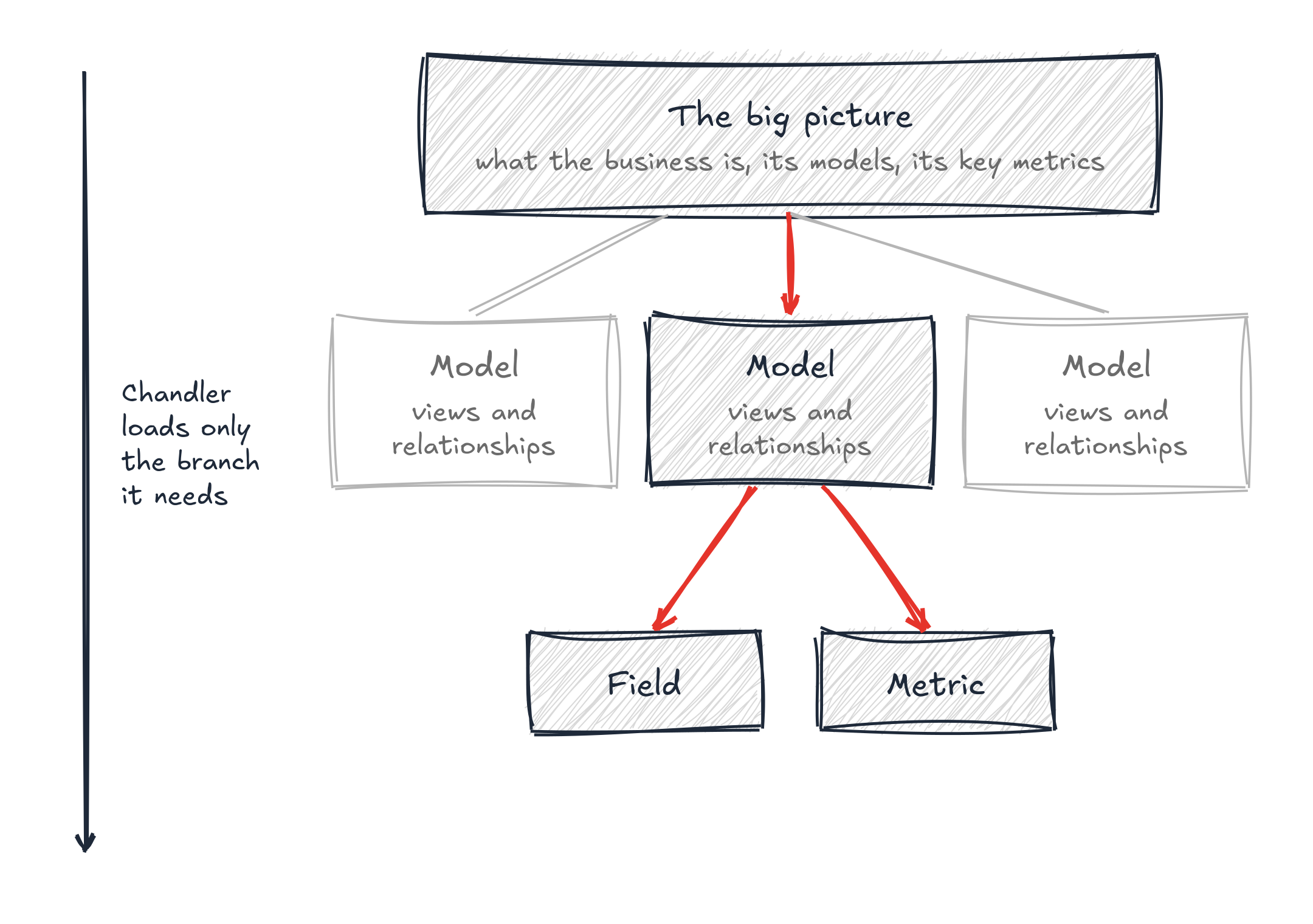
You want to structure your semantics like a tree. On top of everything, you have the big picture. Here you explain:
- what the business is
- what models you have and what they do
- which are the most important metrics and where they live
Then you go down one level and do the same for each model, where you explain views and relationships. Finally, at the view level, you list each field and metric. Some of these come from dbt, and some are defined directly in Omni.
The reason to do this is very simple. When working with AI, the most trivial way is to just load everything into the context. While models nowadays can handle it, they can still get confused. But with a tree-like structure, you only need to load the context that’s really needed for your analysis.
That’s exactly how Chandler moves. It starts at the top of the semantic layer, reads the description at each level to decide where to go, and only loads the full field details for the one topic it picks. Everything else stays out of the context.
Why sync the semantic layer into your own database every night?
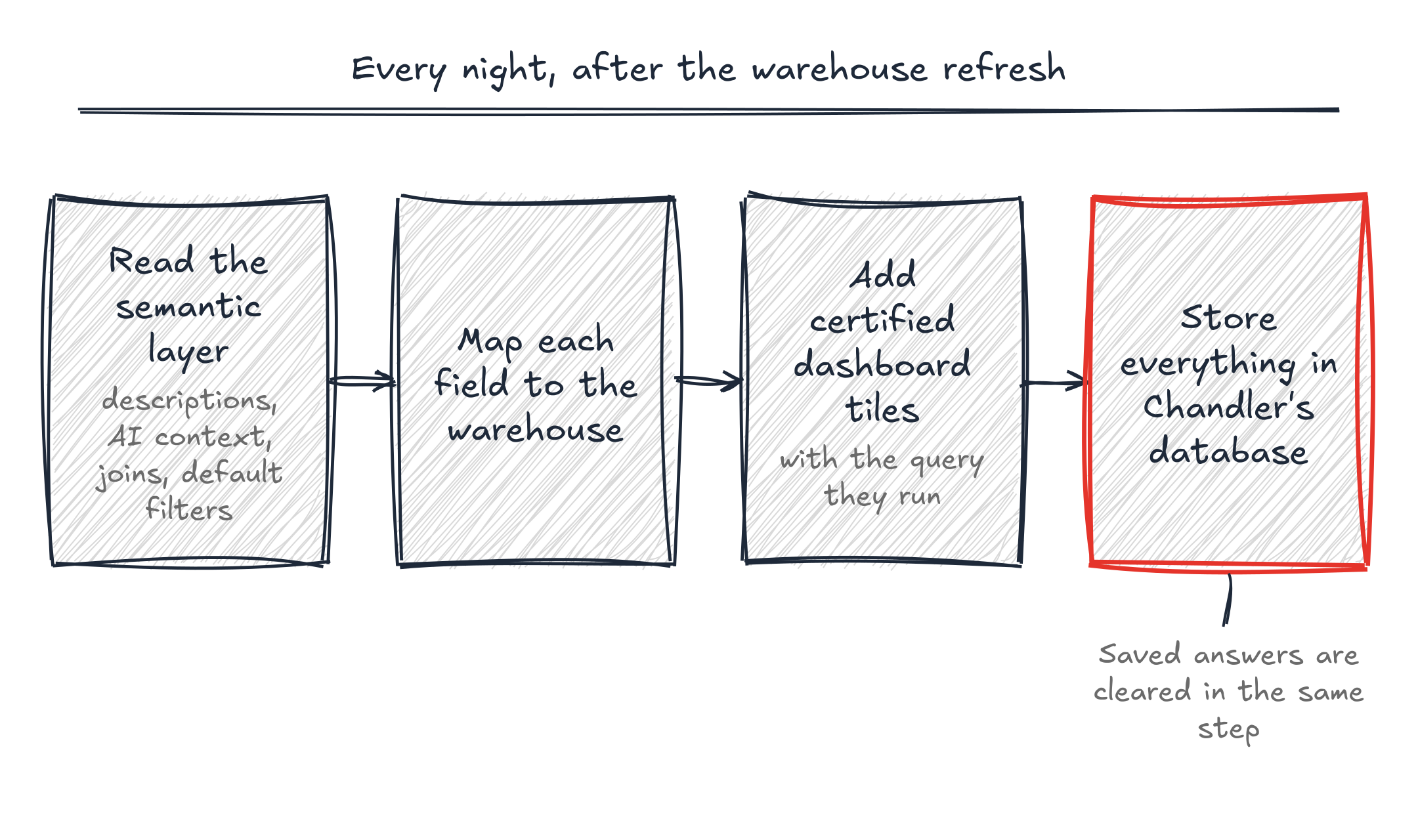
This step is optional, but I think it gives you extra powers. Instead of calling third-party APIs or traversing your Git repository, pull the semantic layer into a dedicated database. This has a few benefits.
First, database access is faster than calling an API and traversing YAML files. But also, your app keeps working if GitHub is down again. Also, you can use structures that help your solution traverse the semantic layer faster, or even use vector searches.
One of the best ideas we implemented was to pull all stamped dashboards. These are dashboards built by us or any of our power users in the business. We’ve verified that these dashboards provide the correct results and tagged them.
So, part of the ETL process is to pull the “tiles” from these dashboards, along with their metadata and the query they run.
From Omni, the nightly run also pulls:
- the descriptions and AI context for every topic and field
- the joins between views, with their exact conditions
- the filters each topic applies by default
- where each field actually lives in the warehouse
The run starts after the warehouse refresh, and it ends by clearing every saved answer. That way, no answer outlives the data and the definitions it was built on.
We also made it strict. If a definition can’t be turned into a real warehouse query, the field is marked as unavailable and Chandler isn’t allowed to use it. A half-translated definition would still run, and it would return a wrong number. Dashboards that need more than one step to build are left out for the same reason, because half a query answers a different question.
How does an AI data bot answer a question?
People can reach Chandler in two ways. Chandler runs as a Slack bot, which is what most people use, and as an MCP server. The MCP server matters just as much, though, because it lets us build more solutions on top of this one. Also, since everyone has it in Claude, they can connect it directly to their own tooling there.
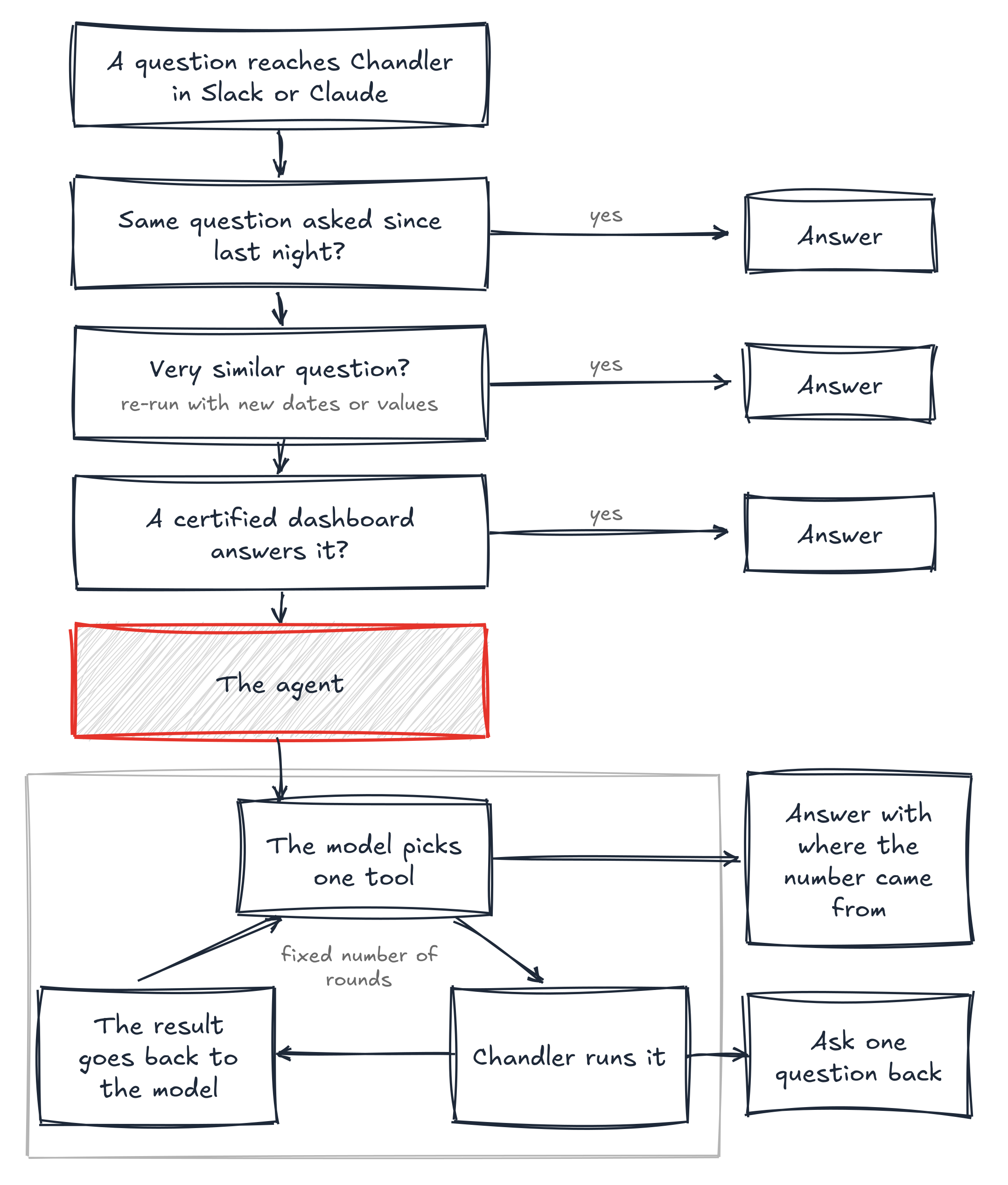
Every question takes the same path, and the cheapest route always goes first. So, Chandler checks:
- if someone asked the exact same question since the last nightly run
- if someone asked a very similar one, and only the dates or a filter value need to change
- if one of the stamped dashboards already answers it
- and only then hands the question to the agent
The stamped dashboard check is careful on purpose. A model decides if a tile answers the same question at the same level of detail, and it can only move the dates. When it’s unsure, it says no. A missed reuse costs a bit of time. A wrong reuse costs a wrong answer.
The agent works in a loop. In each round, the model picks one tool, like loading a topic from the semantic layer or running a query. Then our code runs that tool and shows the model the result. The model never touches the database. Our code holds the keys, and that’s where all the checks live. There’s also a fixed limit on rounds, so a confused model can’t spin forever.
A few rules made a big difference:
- The model writes the query, but not the joins. Those come from the relationships we documented in the semantic layer, because a wrong join silently changes what you count.
- You apply the default filters yourself. We run queries straight on the warehouse, not through Omni, so nothing applies the governed filters for you. The agent has to write them, and it’s told so.
- A query run to look at the data is never the answer. The agent can check a date or the real values in a column first. But that query can never be returned as the result.
- When the question is ambiguous, it asks. A missing date range is fine to default. Anything else gets one question back. And if a field simply doesn’t exist, Chandler says so and points people to the data team.
Finally, every answer says where the number came from. If a stamped dashboard answered it, you get the link. If the agent wrote the query, you get a line on what was counted, over which period, and whether the default filters were applied. You also get at most one warning, like an empty result or a month that isn’t over yet. Those warnings come from simple rules, not from the model.
How do you keep an AI data bot read-only and free of PII?
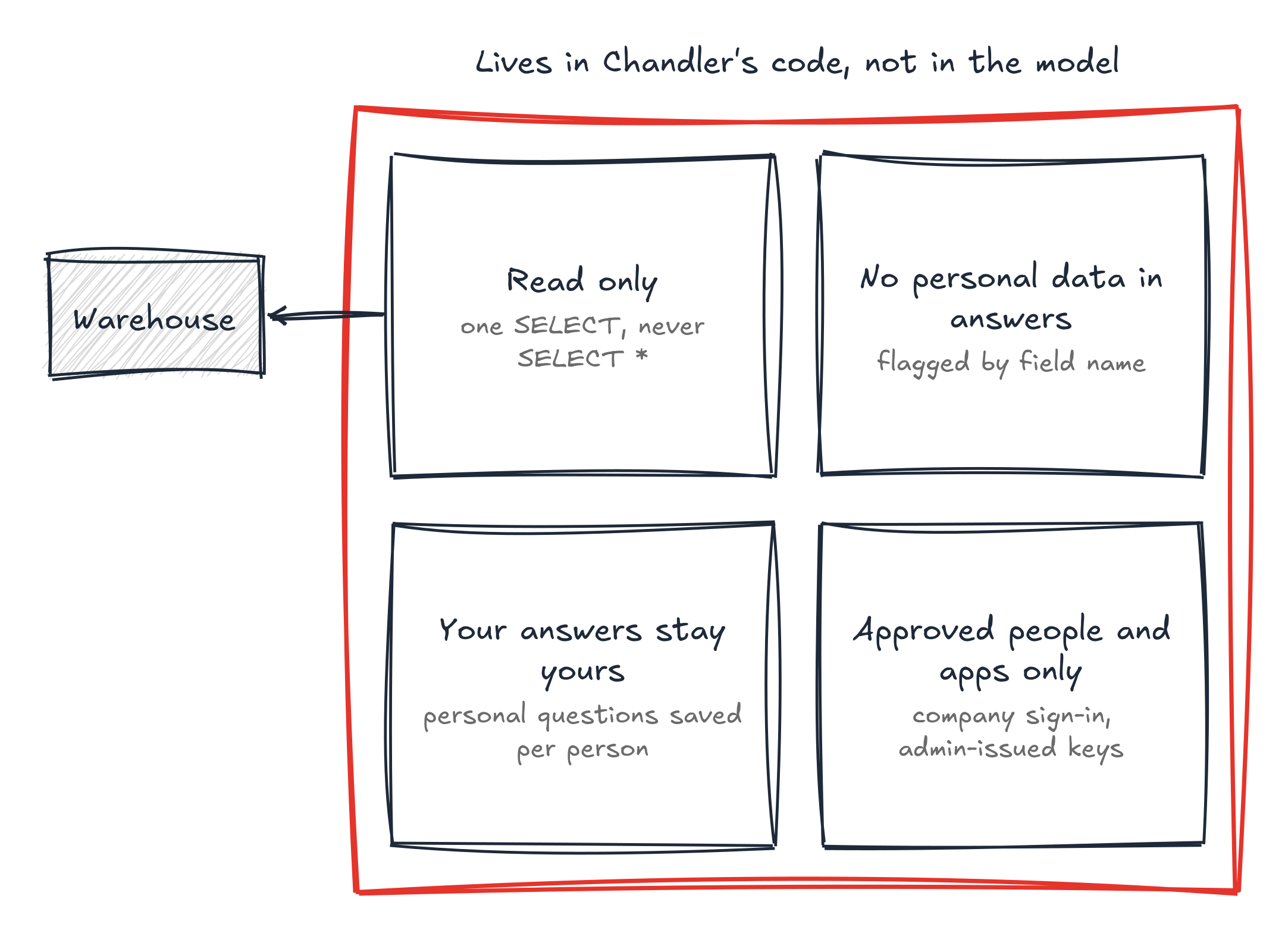
Four controls keep Chandler safe. It can only read, personal data never shows up in an answer, answers about yourself stay yours, and only the people and apps we approve can use it. Each one lives in our code, next to the semantic layer, so none of them depends on the model behaving.
First, Chandler can only read. Its warehouse user is read-only, it can only run a single SELECT, and SELECT * is refused.
Second, personal data stays out of the answers. Omni doesn’t have a PII flag we could read, so Chandler flags fields in the semantic layer by their names, like email, phone, or address. A query that returns one of these fields is refused. But Chandler can still filter or group by them, because that doesn’t show anyone’s data.
We had to tune this, though. At first, anything with “name” in it was flagged. That blocked plan names, account names, and dashboard names, and ordinary questions stopped working. Now a name only counts as personal when it says whose name it is, like a customer or an employee name.
Third, answers about yourself stay yours. Saved answers are shared, so the second person to ask a question gets it faster. But a question like “my pipeline” is saved only for the person who asked it.
Finally, access. People sign in with their company Google account. Apps get keys that only admins can issue, and each key traces back to a person. And who can open the admin side is a simple list we maintain.
How do you monitor an AI data bot after launch?
You monitor an AI data bot by reading what people ask, what the bot did, and what they thought of the answer. The most useful thing monitoring shows you is where the documentation is missing, because every field people ask for that the semantic layer doesn’t have is a gap you can fill in Omni.
Getting honest feedback from people is hard. We launched with a few beta testers. Not everyone really tried it. And while we started getting some results, they quickly stopped getting back to us. That’s how we realised we needed monitoring.
Even after launch, we’ve seen questions about alternatives, instead of people coming to us and saying what they think.
So, I built a small web interface that lets me see their interactions with Chandler, its thought process, the queries it ran, and the feedback they gave us. Everyone across the business has access to it. I’ve seen questions from engineers, product managers, and even the CEO.
People can also rate an answer with a button, or just tell Chandler “that looks wrong”. Both get recorded. And if they ask it to try again, Chandler knows not to repeat the query they rejected.
My favourite part, though, is the list of fields people ask for that the model doesn’t have. That’s your to-do list for the documentation, written by the people who use it.
To be fair, there’s still a lot that nothing checks. Nothing compares the number with a known figure. Nothing checks the sentences the model writes around the rows. And nothing confirms the warehouse refresh finished before the nightly run. So, keep reading those conversations.